
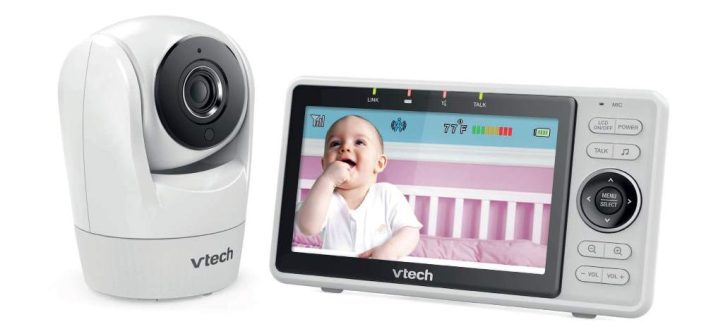
Imagine tucking your little one in for the night, then stepping away with total confidence. You glance at a clear screen and see every peaceful breath. That calm feeling drives many parents to choose a reliable baby monitor. The VTech VM901 delivers exactly that through its sharp 1080p video and smart features. In this detailed VTech VM901 review, we explore why this 1080p baby monitor stands out for modern families.
New parents often worry about sleep safety. According to the Centers for Disease Control and Prevention (CDC), about 3,500 infants face sleep-related deaths each year in the United States. However, the American Academy of Pediatrics (AAP) notes that safe sleep practices have cut these numbers significantly since the 1990s. A quality VTech smart monitor like the VM901 adds extra reassurance without replacing those essential habits. It lets you check in anytime, day or night.
This hybrid device works in two ways. You can use the dedicated parent unit for local viewing, or connect via the app for remote access. Many parents love this flexibility. For instance, one family shared how the dad checks on their baby from work using the phone app. Meanwhile, the handheld screen stays perfect for quick glances at home. Moreover, setup takes just minutes, so you start monitoring right away.
Unboxing and First Impressions
You open the box and find everything ready to go. The package includes the camera unit, a 5-inch parent monitor, power adapters, and a simple guide. The design feels sturdy yet lightweight. Parents appreciate how the camera sits neatly on a shelf or mounts on the wall.
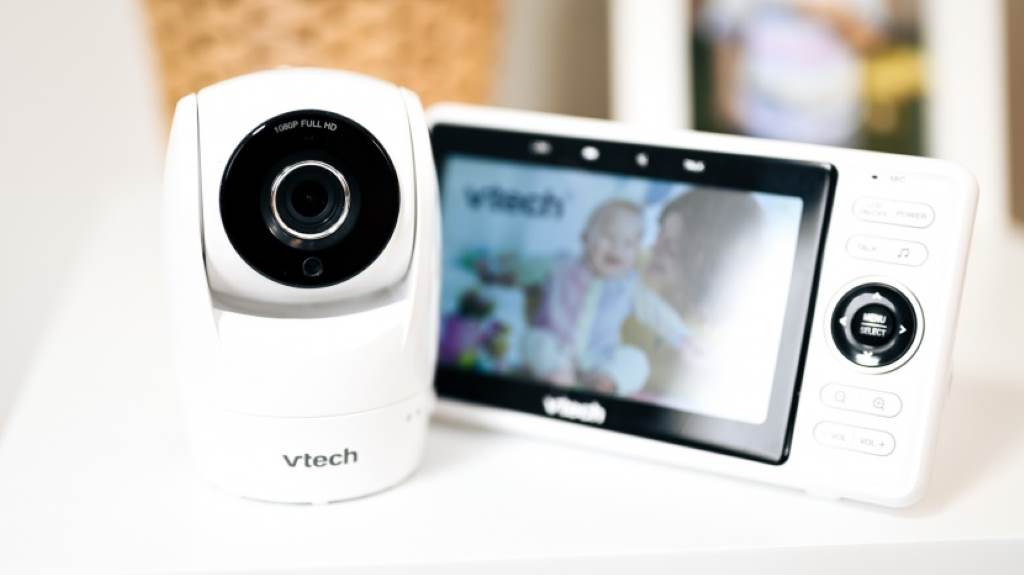
Setup proves straightforward. Plug in the units, and they pair automatically in local mode. If you want app access, download MyVTech Baby 1080p and follow the prompts. Most users finish in under 15 minutes. Additionally, the parent unit charges quickly and offers a handy kickstand for bedside viewing.
The camera looks modern with a clean white finish that blends into any nursery. It features a wide-angle lens for broader coverage. Right away, the crisp display impresses. Colors appear vibrant during the day, and night vision kicks in smoothly without any fuss.
Key Features That Make the VTech VM901 Shine
This VTech smart monitor packs practical tools that enhance daily use. Let’s break them down.
Crystal-Clear 1080p Video Quality
The camera captures full HD 1080p footage. On the parent unit’s 720p screen, details pop. You spot tiny movements, like chest rises during sleep. During tests, reviewers read fine print on toys across the room. Furthermore, the 120-degree wide-angle view covers most nurseries without blind spots.
Remote Pan, Tilt, and Zoom
Control the camera from anywhere. Pan 270 degrees side to side and tilt 152 degrees up and down. Zoom in up to 10 times for close-ups. This feature helps when your baby rolls to the crib’s edge. One parent mentioned using it to watch their toddler play without entering the room.
Impressive Night Vision
Infrared LEDs provide clear black-and-white images in total darkness. No red glow disturbs sleep. Users report seeing every detail, even in pitch-black rooms. The switch to night mode happens automatically, so you never miss a beat.
Two-Way Talk and Soothing Sounds
Speak directly to your baby through the microphone. Comfort them with your voice from another room. The monitor also plays lullabies and white noise. Many families use this to settle fussy nights quickly. Sound clarity remains excellent, with minimal delay.
Temperature Sensor and Alerts
A built-in sensor displays room temperature on the screen. Set alerts for too hot or too cold conditions. This helps maintain a safe 68-72°F range, as recommended by experts. Motion and sound detection send notifications to your phone.
Dual Connectivity Options
Use the local FHSS connection for secure, no-internet viewing up to 1,000 feet outdoors. Or switch to WiFi for worldwide access via the app. This hybrid approach suits different needs. For example, grandparents love the simple parent unit during visits.
Real-Life Performance: How It Holds Up Daily
In everyday testing, the VTech VM901 performs reliably. Range tests show strong signals through several walls—up to 155 feet indoors in some reviews. Outdoor reach hits the claimed 1,000 feet easily.
Battery life on the parent unit lasts about 5-6 hours with the screen on. That covers most naps. For longer use, keep it plugged in. The app connects quickly, with just a 1-2 second delay.
Parents share positive stories. One mom described checking her baby while grocery shopping. Another highlighted how the clear video eased separation anxiety during work trips. However, a few note occasional app glitches on older phones, though updates often fix them.
Security stands strong. Local mode avoids internet risks entirely. WiFi uses encryption, reducing hacking concerns compared to some smart devices. Explore Cost-Effective Tech Solutions Every Small Business Can Use.
Pros and Cons Based on User Feedback
Every product has strengths and areas for improvement. Here’s a balanced look.
Pros
- Versatile dual-mode operation fits any situation.
- Sharp 1080p baby monitor video outperforms many competitors.
- Easy controls make adjustments intuitive.
- Reliable night vision and audio for peaceful nights.
- Expandable to multiple cameras for growing families.
- Temperature monitoring adds practical safety.
Cons
- Battery drains faster with constant screen use.
- App may lag on weak WiFi connections.
- No built-in recording for clips.
- EMF levels slightly higher than some non-WiFi models.
Overall, pros outweigh cons for most users. Families value the flexibility and quality.
Who Should Buy the VTech VM901?
This monitor suits first-time parents wanting simplicity with smart options. It works great for working moms or dads needing remote checks. Also, families preferring a dedicated screen avoid phone battery drain.
If you have a large home, the strong range helps. Those concerned about WiFi security appreciate local mode. However, if you need advanced sleep tracking, consider specialized models.
Edge cases include travel. The portable parent unit travels easily, no WiFi required. For multiple kids, add cameras seamlessly.
Comparison with Similar Monitors
How does it stack up? Against pure non-WiFi options like Babysense MaxView, the VM901 adds app access. Versus full smart cams like Nanit, it offers a physical screen without subscription fees.
Users often choose it over Infant Optics for better resolution. It balances features without overwhelming complexity.
Tips for Getting the Most Out of Your Monitor
Position the camera high for best views. Adjust sensitivity to avoid false alerts. Update the app regularly for improvements. Use local mode at night to save battery.
Clean the lens gently for clear images. Share app access securely with caregivers.
Conclusion
The VTech VM901 delivers outstanding value through its clear 1080p video, flexible connectivity, and user-friendly design. It provides peace of mind with features like pan-tilt-zoom, two-way talk, and temperature alerts. Real parents praise its reliability and ease. While battery life could improve, the overall performance makes it a top choice.
If you’re seeking a versatile 1080p baby monitor that grows with your family, this VTech smart monitor fits perfectly. Ready to experience that reassurance? Check out the full details and grab yours today through the link in the intro.
FAQs
Is the VTech VM901 safe for everyday use?
Yes, it follows safety standards with encrypted connections. Local mode eliminates internet risks. Always follow AAP safe sleep guidelines alongside any monitor.
Can I use the VTech VM901 without WiFi?
Absolutely. The dedicated parent unit works independently with a secure local signal. WiFi remains optional for remote viewing.
How good is the night vision on this 1080p baby monitor?
Excellent. Infrared provides sharp, clear images in complete darkness. Parents see details like breathing without disturbance.
Does the app work on both iOS and Android?
Yes, the MyVTech Baby 1080p app supports both platforms. It offers motion notifications and full control.
Can I add more cameras to the VTech smart monitor?
Definitely. It expands to four cameras. View them split-screen on the parent unit or app.



Leave a Reply